Showing posts with label Scoreboard. Show all posts

PES 2020 Scoreboard Pack Serie A TIM v3.0 by Andò12345

Gambar - PES 2020 Scoreboard Pack Serie A TIM v3.0 by Andò12345

New scoreboard for eFootball PES 2020 PC. To use this mod you need Scoreboard Server by Zlac to be installed in your system.

Changelog 3.0

- No more contrasting names in DAZN Scoreboard (thanks to @Angelj107 for help and to @zlac for have implemented this new function in new scoreboard server)
- New replay desing in DAZN Scoreboard
- New black Juventus logo for Sky Sport Scoreboard for avoiding color contrast

Preview :


How to Install :

1. Install PES 2020 [Sider module] Scoreboard Server for Sider 6 by Zlac ( Read carefully )

2. Extract scoreboard with WinRAR, copy all folder to \content\scoreboard-server\

3. Open map_competitions.txt in this location \content\scoreboard-server\ and add this line

# Serie A
18, Serie A TIM\DAZN (Italy)
18, Serie A TIM\Sky Sport (Italy)
18, Serie A TIM\Sky Sport Serie A (Italy)
18, Serie A TIM\Sky Sport Uno (Italy)
18, Serie A TIM\Serie A Fantasy

4. Save it and done.

5. Run sider.exe and play PES 2020 via Steam. Scoreboard will appear automatically according to its competitions.

Download Now

Share:

PES 2020 NEW DFB Pokal Full Name Scoreboard by SG

Gambar - PES 2020 NEW DFB Pokal Full Name Scoreboard by SG

New DFB Pokal Scoreboard for eFootball 2020 PC. This scoreboard is made by --SG--

Features :

DFB Pokal Scoreboard style.
Full team names appearing on your scoreboards.
DFB Pokal Watermark logo.
Evoweb patch Compatible.
NEW lua file structure easy to maintain, thanks to @juce and @zlac . dose not support Exhibition mod. for more option refer to user Installation section.
Fully working with most game modes: Master League , Become a Legend, League.

Download Now

Share:

PES 2017 Scoreboard Server For Smoke Patch V3

Gambar - PES 2017 Scoreboard Server For Smoke Patch V3

Scoreboard server (sider) for smoke patch, is made to be fully compatible with smoke patch, made by the best scoreboard makers, we stopped creating our own scoreboards due to the lack of time, as we are working on three game versions. Please read the info carefully before using any addons.

List of Scoreboards :

Africa Cup of Nations
Argentine Primera Division
Brasileiro
Bundesliga
Campeanato Scotiabank
Champions League
Copa America
Copa del Rey
Copa Libertadores
Eredivisie
EURO
Europa League
Exhibition
FA Cup
FIFA Club World Cup
FIFA World Cup
LaLiga
LaLiga 123
Liga NOS
Ligue 1
MLS
Premier League
Serie A
Serie B
SkyBET Championship
Supercoppa TIM
TIM Cup

Installation:


  • Be sure you have the latest Sider SP17 
  • Extract the installer from archive
  • Run (Sider SP17 - trophies.exe) and select the game folder (sider SP17 should be installed there)


Credits :

All scoreboards in the server are made by various makers, big thanks to all of them and anyone who worked on this, special thanks to evo web and All PES-Moders.

Download Now

Share:

PES 2020 TV Logo Scoreboards Euro 2020 by Geniowe2002

Gambar - PES 2020 TV Logo Scoreboards Euro 2020 by Geniowe2002

Added various TV Logo for eFootball PES 2020 EURO 2020 Scoreboard by Geniowe2002.

*Choose only 1 TV Logo

Instructions:

via Sider

1. Choose your TV Logo

2. Copy TV Logo folder to \livecpk folder

3. Open sider.ini and add

cpk.root = ".\livecpk\Folder Name"

4. Save it and done

via CPK

1. Extract the file with WinRAR,

2a. If the face is not a CPK file, you need to make it to CPK first, you can follow it here.

2b. If it's already in CPK File, Copy .CPK file to your PES 2020 download folder.

steamapps\common\eFootball PES 2020\download\

3. Generate with PES 2020 DpFileList Generator.

4. Done.

Download Now

Share:

PES 2017 UEFA Euro 2020 Scoreboard

Gambar - PES 2017 UEFA Euro 2020 Scoreboard

UEFA Euro 2020 Scoreboard For PES 2017

Installation :

1. Extract the file with WinRAR

2. Copy CPK File to

C:\Program Files(x86)\Steam\Steamapps\Common\Pro Evolution Soccer 2017\download\

3. Generate with PES 2017 DpFileList Generator.

4. Done !

Credits :

KK-ADDS PES EDIT TEAM

Download Now


Share:

PES 2020 Scoreboard UEFA Champions League by Overall

Gambar - PES 2020 Scoreboard UEFA Champions League by Overall

New scoreboard for eFootball PES 2020 PC. To use this mod you need Scoreboard Server by Zlac to be installed in your system.

Includes :

UCL RMC, BEIN and No-logo version

Download Now

Share:

PES 2020 NEW Bundesliga Full Name Scoreboard by SG

Gambar - PES 2020 NEW Bundesliga Full Name Scoreboard by SG

New Bundesliga Scoreboard for eFootball 2020 PC. This scoreboard is made by --SG--

Features :

Add Bundesliga Scoreboard style.
Full team names appearing on your scoreboards.
Bundesliga Watermark logo.
Evoweb patch Compatible.
Fully colored team's emblems Bundesliga style.
Standalone scoreboard for each team, no need to download the full pack.
Fully working with all game modes:Exhibition, Master League , Become a Legend, League.

Download Now

Share:

PES 2020 Scoreboard Server v1.30 for Sider 6.3.1+ by Zlac

Gambar - PES 2020 Scoreboard Server v1.30 for Sider 6.3.1+ by Zlac

Add many scoreboards as you want with new coreboard Server for Sider 6 by Zlac.

How to Use :

1. Install Sider 6 ( latest version )

1a. Make backup of your old v1 version of Scoreboard Server content\scoreboard-server folder and then delete content\scoreboard-server folder

2. Unpack v1.1 archive and copy folders content and modules to your sider folder (overwrite if asked)

3. Unpack v1.30 archive and copy folder modules to your sider (overwrite if asked)

4. (If not done already) Download and install CommonLib.lua v1

5. (If not done already) Add lua.module = "ScoreboardServer.lua" under CommonLib in sider.ini file
5. [Optional] Customize map_competitions.txt files (located inside content\scoreboard-server folder) and add your own folders with scoreboard files in content\scoreboard-server folder

[ EXAMPLE ] How to apply the Scoreboard Pack:

1. Download it from the download link, extract the archive and overwrite the current content folder in your sider with the content folder from the scoreboard pack.

2. Done

Features of Scoreboard Server :


  • GDB-style unlimited scoreboard management
  • file packaging is identical to .cpk scoreboards - files for each scoreboard must be extracted from their original .cpk files and placed into separate folders (see image below - shows 4 scoreboards - EPL, sb1, sb2, sb3)
  • scoreboards are assigned to competitions via map_competitions.txt file - i.e. all teams participating in particular competition will use identical scoreboard - see the included map_competitions.txt file for some examples
  • more than one scoreboard can be assigned to a single competition - in this case, script selects one scoreboard randomly

Required folder structure for one scoreboard inside content\scoreboard-server:
custom_scoreboard_name\extracted_contents_of_one_scoreboard_cpk_archive​

  • .txt assignment file reloading (key 0) - available at any moment, useful for making quick fixes to .txt assignment file, without needing to restart the game
  • toggle between manual ball selection and automatic scoreboard assignment via .txt file (key 9)
  • if manual selection is used, then manually selected scoreboard has priority over the scoreboard which would otherwise be assigned via .txt file
  • additional options, available only in manual selection mode:
  • Manual selection through all the available scoreboards (PageUp/PageDown keys)
  • IMPORTANT: only the scoreboards which are assigned via .txt files are available for cycling-through!! A scoreboard which exists only as a subfolder in the external content root (content\scoreboard-server), but isn't assigned to any competition via .txt file WILL NOT be available for manual selection!
  • Favorite scoreboard - current manual selection can be saved permanently as a favorite scoreboard (key 7) or recalled to be used later (key 8)
  • scoreboard previews on overlay menu
  • scoreboards have no preview files yet - someone needs to make them :)
  • preview file name: preview.dds
  • preview file location: scoreboard's top folder - e.g. <your_sider_dir>\content\scoreboard-server\sb4\preview.dds
  • automatic selection of league-mode scoreboard(s) in exhibition mode if both teams belong to the same league (requires CommonLib v1 to be installed)
  • applies only to LEAGUES - cups and other competitions are ignored
  • script reads CompetitionEntry.bin file to determine whether two teams belong to the same league - selection may not be 100% accurate if teams have been moved to different leagues only in EDIT mode
  • [NEW PES 2020 v1.1] Short introductory broadcast anthems are supported
  • those anthems are played (and stopped) BEFORE game shows players in tunnels
  • anthem file must be named intro_anthem.mp3 and must be located in root folder of your scoreboard - every scoreboard can have its own broadcaster intro, one .mp3 file per scoreboard root
  • additional content\scoreboard-server\Default folder is provided as generic fallback - if certain competition does not have scoreboard assigned in scoreboard server, then generic intro_anthem.mp3 from Default folder will be played
  • IMPORTANT: Only generic intro_anthem.mp3 from Default folder IS ALWAYS used in EXHIBITION MODE!! Intros from specific scoreboard folders are only used in leagues and cups.


Current limitations:

  • Inaccurate scoreboard selection during replays - saved replays do not include tournament_ID - if the scoreboard used in saved replay has been assigned via map_competition.txt, then there is no way to re-select exactly the same ball during replay - exhibition mode scoreboard is most likely going to be selected.
  • It is not advisable to change any overlay-related settings after the match-loading screen has appeared or during the match. In-game behavior will be unpredictable in such circumstances. You've been warned ;) Make your selections BEFORE you hit the Next match button.


Credits:

@Zlac
@juce and @nesa24 for sider
Scoreboard creators: @1002MB

More Info : https://www.evo-web.co.uk/threads/80881/

Download Now

Share:

PES 2020 SP20 - Sider Scoreboards R4

Gambar - PES 2020 SP20 - Sider Scoreboards R4

New scoreboard pack for Smoke Patch 20.

Included :

UEFA Champions League (replay + scoreboard)
UEFA Europa League (replay + scoreboard)
UEFA Super Cup (replay + scoreboard)
Copa Libertadores (replay + scoreboard)
FIFA World Cup Qatar (replay + scoreboard)
UEFA Euro (replay + scoreboard)
Copa America (replay + scoreboard)
International Champions Cup (replay only)
Premier League (replay + bein scoreboard)
Premier League (replay + nbc scoreboard)
Championship (replay + bein scoreboard)
Championship (replay + BBC scoreboard)
FA Cup (replay + BBC scoreboard)
Community Shield (replay only)
Bundesliga (replay + ESPN scoreboard)
Bundesliga (replay + bein scoreboard)
DFB Pokal (replay only)
DFL Supercup (replay only)
Serie A (replay + Rai scoreboard)
Serie A (replay + bein scoreboard)
Serie B (replay + DAZN scoreboard)
Serie B (replay + bein scoreboard)
Supercoppa Italiana (replay only)
LaLiga (replay + bein scoreboard)
LaLiga (replay + ESPN scoreboard)
LaLiga2 (replay + bein scoreboard)
LaLiga2 (replay + ESPN scoreboard)
Copa del Rey (replay only)
MLS (replay + ESPN scoreboard)
Ligue 1 (replay + canal+ scoreboard)
Ligue 2 (replay + canal+ scoreboard)
Campeonato Scotiabank (replay + CDF scoreboard)
Copa Chile (replay + CDF scoreboard)
Eredivisie (replay + ESPN scoreboard)
Liga NOS (replay + Sport TV scoreboard)
Superliga Argentina (replay + TyC Sports scoreboard)
Sportoto super lig (replay + bein scoreboard)
Russian Premiere League (replay + МАТЧ ПРЕМЬЕР scoreboard)
Liga Aguila (replay + RCN scoreboard)
Liga Aguila (replay + Win Sports scoreboard)
Copa Aguila (replay + Win Sports scoreboard)
Brasiliero
Exhibition
BBC Sport
bein
Canal+ sports
ESPN

Installation:

1. Install Sider SP20

2. Extract the scoreboard installer and run the installer and select game directory

3. Done

*the scoreboards will be active automatically when you start the game with sider sp.

Download Now

Share:

PES 2019 Scoreboard Server R7 for SMOKE Patch 2019

Gambar - PES 2019 Scoreboard Server R7 for SMOKE Patch 2019

Scoreboard server (sider) for smoke patch, is made to be fully compatible with smoke patch, made by the best scoreboard makers, we stopped creating our own scoreboards due to the lack of time, as we are working on three game versions.

What is (Sider)?

Sider is a small tool made by (juce), allows more things to be injected directly into the game such as more stadiums or automatic scorecards or others, bypassing any game limits.

How does it work?

simply run (sider.exe) BEFORE starting the game, it will automatically be running.

What is Scoreboard server?

this is a server that allows the scoreboards to be linked to the different leagues including CL and other famous tournaments, and will show real scoreboard for the competitions.

How to Install?

No installation needed, just extract the sider folder from the archive, and run sider.exe from this folder before starting the game.

How to Remove?

To deactivate sider, just quit it from task-bar, to remove completely just delete the sider folder

List Sider Scoreboards :

Brasileiro
Bundesliga
Campeonato chile
Community Shield
Copa America
Copa Argentina
Copa Chile
Copa del Rey
Copa Libertadores
Coppa Italia
Coupe de France
Danish Superliga
DFB Pokal
DFL Supercup
dirlist.txt
EFL
Eredivisie
FA Cup
FIFA Club World Cup
FIFA World Cup
International Champions Cup
J-League
Japan Emperors Cup
Jupiler Pro League
LaLiga
Ligue 1
Ligue 2
Premier League
Scottish Cup
Serie A
sp exhibition
SPFL
Super Lig
Supercopa Argentina
Supercopa de Espana
Supercoppa Italiana
Superliga Argentina
Trophee des Champions
UEFA Champions League
UEFA Europa League
UEFA Super Cup

Installation:

- be sure you have the latest sider SP19
- extract the scoreboard installer
- run the installer and select pes 2019 directory

Download Now

Share:

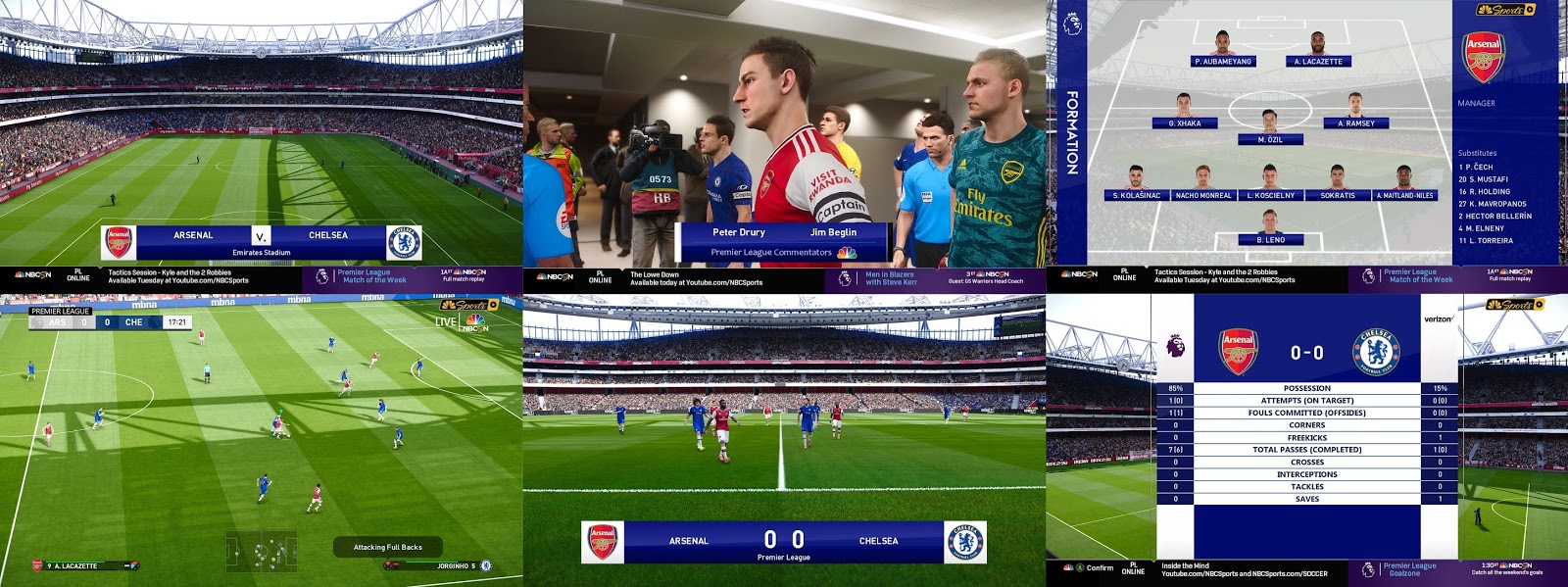
PES 2020 Scoreboard NBCSN Premier League V4 by Predator002

Gambar - PES 2020 Scoreboard NBCSN Premier League V4 by Predator002

New European Qualifiers scoreboard for PES 2020 PC, Before using this scoreboard, Scoreboard Server Module by Zlac has to be installed in your PC.

Preview :


How to Install :

1. Install PES 2020 Scoreboard Server by Zlac

2. Extract scoreboard with WinRAR, copy Premier League NBSCN folder to

\content\scoreboard-server\

3. Open map_competitions.txt in this location \content\scoreboard-server\ and add this line

17, Premier League NBSCN  #Premier League

4. Save it and done. 

5. Run sider.exe and play PES 2020 via Steam. Scoreboard will appear automatically according to its competitions.

Download Now

Share:

PES 2020 Scoreboard EFL Championship by SG

Gambar - PES 2020 Scoreboard EFL Championship by SG

New EFL Championship scoreboard for PES 2020 PC, Before using this scoreboard, Scoreboard Server Module by Zlac has to be installed in your PC.

April 23,2020

V2.0

- EFL Championship scoreboard update release

Preview :


How to Install :

1. Install PES 2020 Scoreboard Server by Zlac

2. Extract scoreboard with WinRAR, Copy England folder to

\content\scoreboard-server\

3. Open map_competitions.txt in this location \content\scoreboard-server\ and add this line

79,     England\EFL championship
83,     England\EFL championship

4. Save it and done.

5. Run sider.exe and play PES 2020 via Steam.

Download Now

Share:

PES 2020 Scoreboard J1 League by Klerry

Gambar -  PES 2020 Scoreboard J1 League by Klerry

New J1 League scoreboard for PES 2020 PC, Before using this scoreboard, Scoreboard Server Module by Zlac has to be installed in your PC.

Preview :


How to Install :

1. Install PES 2020 Scoreboard Server by Zlac

2. Extract scoreboard with WinRAR, Copy J1 League folder to

\content\scoreboard-server\

4. Open map_competitions.txt in this location \content\scoreboard-server\ and add this line

# Japan
52, J1 League

4. Save it and done. 

5. Run sider.exe and play PES 2020 via Steam.

Download Now

Share:

PES 2020 England Scoreboard Pack by SG

Gambar - PES 2020 England Scoreboard Pack by SG

New England scoreboards for PES 2020 PC, Before using this scoreboard, Scoreboard Server Module by Zlac has to be installed in your PC.

Feature :

FA Cup scoreboard.
FA community shield scoreboard.
EFL Championship scoreboard.

Preview :


How to Install :

1. Install PES 2020 Scoreboard Server by Zlac

2. Extract scoreboard with WinRAR, Copy ENGLAND folder to

\content\scoreboard-server\

3. Open map_competitions.txt in this location \content\scoreboard-server\ and add this line

#England
23,     England\FA Cup
86,     England\Community Shield
79,     England\EFL Championship
83,     England\EFL Championship

4. Save it and done.

5. Run sider.exe and play PES 2020 via Steam.

Download Now

Share:

PES 2020 Scoreboard CONMEBOL Libertadores by SG

Gambar - PES 2020 Scoreboard CONMEBOL Libertadores by SG

New CONMEBOL Libertadores scoreboard for PES 2020 PC, Before using this scoreboard, Scoreboard Server Module by Zlac has to be installed in your PC.

Preview :


How to Install :

1. Install PES 2020 Scoreboard Server by Zlac

2. Extract scoreboard with WinRAR, Copy CONMEBOL folder to

\content\scoreboard-server\

3. Open map_competitions.txt in this location \content\scoreboard-server\ and add this line

8,        CONMEBOL\Copa Libertadores
1032,     CONMEBOL\Copa Libertadores
2056,     CONMEBOL\Copa Libertadores
3080,     CONMEBOL\Copa Libertadores
4104,     CONMEBOL\Copa Libertadores
9,        CONMEBOL\Copa Libertadores
1033,     CONMEBOL\Copa Libertadores
2057,     CONMEBOL\Copa Libertadores
3081,     CONMEBOL\Copa Libertadores
4105,     CONMEBOL\Copa Libertadores
5129,     CONMEBOL\Copa Libertadores
6153,     CONMEBOL\Copa Libertadores
7177,     CONMEBOL\Copa Libertadores
8201,     CONMEBOL\Copa Libertadores
10,       CONMEBOL\Copa Libertadores

4. Save it and done. 

5. Run sider.exe and play PES 2020 via Steam.

Download Now

Share:

PES 2020 NEW La Liga & UEFA Champions League Font by KTGR

Gambar - PES 2020 NEW La Liga & UEFA Champions League Font by KTGR

Added new font for eFootball PES 2020 PC version made by KTGR. All credits go to KTGR.

Feature :

- LaLiga Santander Font
- UCL Font

*Remember you can only use 1 font at a time in PES 2020 !

Preview:


Install : 

1. Extract & Copy ktgrfont folder to livecpk\ folder

2. Open "sider.ini" with notepad++ and add this line:

cpk.root = ".\livecpk\ktgrfont\standard"

3. Save it and done

*UPDATE 1 APR 2020

UCL

New letters from different languages:
Š Ą Ę Ü etc., and russian letters compatible!

LA LIGA

New letters from different languages:
Š Ą Ę Ü etc., turkish, greek, slavic and german letters compatible! :BEER:
in some places font appears in the bold version
font size improved

Password : KTGR

Download Now

Share:

PES 2020 Scoreboard The FA Community Shield by SG

Gambar - PES 2020 Scoreboard The FA Community Shield by SG

New scoreboard for eFootball PES 2020 PC. To use this mod you need Scoreboard Server by Zlac to be installed in your system.

Preview:


How to Install :

1. Install PES 2020 [Sider module] Scoreboard Server for Sider 6 by Zlac ( Read carefully )

2. Extract scoreboard with WinRAR,

3. Copy England folder to

\content\scoreboard-server\

4. Open map_competitions.txt in this location \content\scoreboard-server\ and add this line

#England
86,     England\Community Shield

4. Save it and done.

5. Run sider.exe and play PES 2020 via Steam. Scoreboard will appear automatically according to its competitions.

Credits :

SG

Download Now

Share:

PES 2020 Scoreboard The Emirates FA Cup by SG

Gambar - PES 2020 Scoreboard The Emirates FA Cup by SG

New The Emirates FA Cup scoreboard for PES 2020 PC, Before using this scoreboard, Scoreboard Server Module by Zlac has to be installed in your PC.

Preview:


How to Install :

1. Install PES 2020 Scoreboard Server by Zlac

2. Extract scoreboard with WinRAR, copy folder to

\content\scoreboard-server\

3. Open map_competitions.txt in this location \content\scoreboard-server\ and add this line

#England
23,  England\FA Cup

4. Save it and done.

5. Run sider.exe and play PES 2020 via Steam.

Download Now

Share:

Blog Archive